

How It Works
Build your study app without writing code
Turn your research protocol into an app without coding. Choose your study features, build interactive content and assessments, set release rules, and preview the participant experience before launch. Participants access your study through iOS, Android, or a web browser.
Step 1: Choose the features in your app
Turn on the features your study needs, such as modules, trackers, goal setting, a community forum or an AI chatbot. Drag them into the order they appear in the app's bottom navigation bar. Extras like FAQs, resources, and a diary go in the side drawer.
Researcher View

Pathverse App Builder settings for enabling study features and arranging app navigation.
Step 2: Build each module from cards
Researcher View
Create lessons, check-ins, and assessments by combining cards with text, images, videos, surveys, or cognitive tasks. Drag cards into order to shape the participant experience—no coding required.
Participant View


Step 3: Decide when each module opens
Add one or more release conditions to a module and choose whether all of them or any of them must be met. Each release can send a push notification and reminders, and you set when the module closes again.
Researcher View

Participant View

Step 4: See each participant's path before you launch
The module release preview maps every module and its conditions. Pick a participant account to see which modules are completed, released or still locked for that person, and check your logic before the study goes live.
Researcher View

Flowchart preview showing study modules and the release conditions connecting a participant’s journey.
Step 5: Invite Participants to Join on Mobile or Web
Participants download the app (iOS and Android) or access the app on using a web browser. They complete modules as they open, sync their activity, log exercise and earn badges. Their responses and device data come back to your study. Some features (e.g., notifications, wearable sync, EMA) require the mobile app and are unavailable on the web.
Participant Views

Education Lessons

Wearable Data

Community Forum

Goal Setting
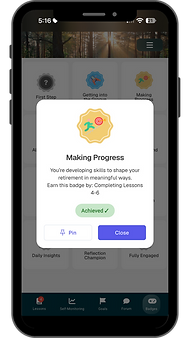
Badges

© 2026 Pathverse Inc.


